
Contents
- 1 Introduction
- 2 Prerequisites
- 3 Why Azure API Version Handling Fails Without a Gateway Layer
- 4 Step-by-Step Guide to Configure the APIM Policy Fragment
- 4.1 Step 1: How Azure API Version Handling Reads Incoming Headers
- 4.2 Step 2: Azure API Version Handling — Apply Conditional Logic
- 4.3 Step 3: Set Override Headers When Condition Matches
- 4.4 Step 4: Silent Failure Handling
- 4.5 Step 5: The Complete Policy Fragment
- 4.6 Step 6: Reference the Fragment in Your API Policy
- 4.7 Step 7: Validate the Azure API Version Handling Behaviour
- 5 Conclusion: Reliable Azure API Version Handling at Scale
Introduction
Azure API version handling is one of the most overlooked challenges in mobile app development. When older Android and iOS clients send outdated API version headers, backends built on newer versions break. As a result, you get cascading failures across downstream services. Moreover, these failures do not just affect one team — they hit backend engineers, frontend developers, and operations staff all at once.
When building modern APIs, supporting multiple app versions is very common. Over time, backend services evolve — and older mobile apps keep sending requests with outdated headers. In addition, missing metadata makes the problem worse. As a result, three practical challenges appear:
- How do you enforce the correct API version without breaking older clients?
- How do you ensure backward compatibility during a migration period?
- How do you apply routing and transformation logic consistently across multiple APIs?
Fortunately, Azure API Management (APIM) policy fragments solve all three. A fragment lets you share reusable policy logic across APIs. In other words, you write the logic once and apply it everywhere — covering conditional logic, header checks, routing rules, and transformation.
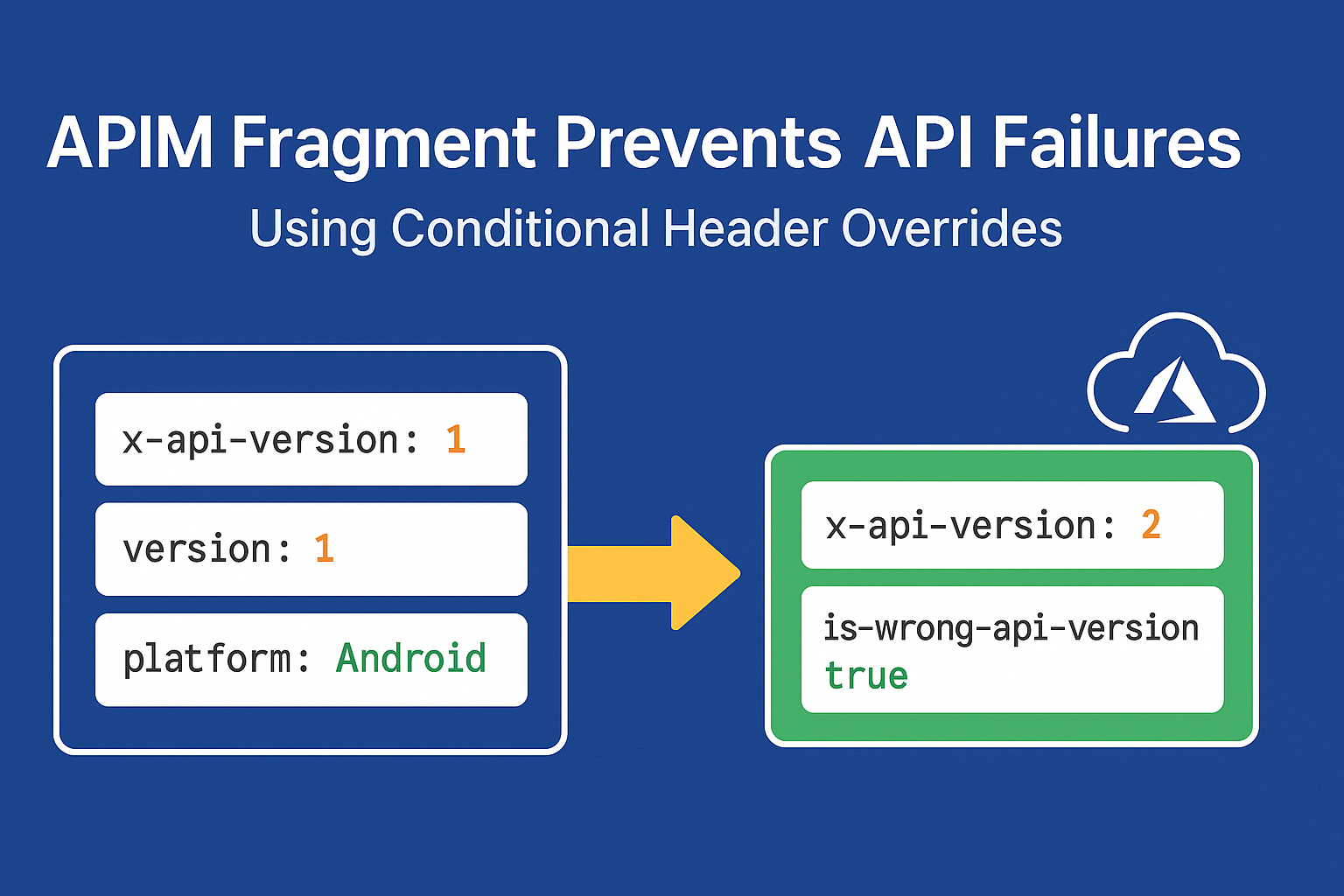
In this article, we walk through a real-world example. Specifically, a fragment checks incoming request headers for platform and API version. It then upgrades outdated mobile clients to the current version automatically — so you get predictable behavior without emergency patches.
Prerequisites
- An Azure API Management instance with at least one API configured.
- Access to the APIM portal or ARM/Bicep templates to manage policy fragments.
- Basic familiarity with APIM inbound policies and C# policy expressions.
Why Azure API Version Handling Fails Without a Gateway Layer
In real-world mobile environments, not all users upgrade their apps right away. For example, some apps still send x-api-version: 1 long after the backend has moved to version 2. Consequently, this gap causes serious problems.
Specifically, this becomes critical when:
- The microservice backend no longer supports API version 1.
- Newer frontend apps (web, kiosk, partner systems) already expect API version 2.
- The backend team has already removed version 1 logic.
- Older devices or users cannot — or will not — update their apps quickly.
⚠️ Without a protective layer, requests from old mobile apps cause backend failures, break dependent downstream services, and force frontend teams into costly emergency deployments.
Therefore, proper Azure API version handling at the gateway is essential. Instead of patching each service one by one, you apply a single policy fragment. It upgrades outdated requests silently and works the same way every time.
Step-by-Step Guide to Configure the APIM Policy Fragment
Step 1: How Azure API Version Handling Reads Incoming Headers
First, the fragment reads three headers from every incoming request. If any header is missing, safe defaults apply automatically. In other words, the policy never fails on missing input.
[table]
Step 2: Azure API Version Handling — Apply Conditional Logic
Next, the condition checks two things at once. It looks for x-api-version == "1" and also checks whether the platform is Android or iOS. Both must be true for the override to fire. As a result, web, kiosk, and partner systems are completely unaffected.
💡 Why target only Android and iOS? Web browsers and partner integrations are updated centrally and quickly. Only mobile apps — distributed via app stores with slow adoption curves — require this protective fallback.
Step 3: Set Override Headers When Condition Matches
When both conditions are true, the fragment takes two actions:
- Rewrites
x-api-versionto"2"— so the backend always treats the request as version 2. - Adds
is-wrong-api-version: true— a tracking header for logging pipelines, analytics dashboards, and push notification systems.
1️⃣ x-api-version — API version override
This header is rewritten from "1" to "2" transparently. Consequently, the backend never sees the old version at all.
🔹 exists-action=”override” replaces the header value if it already exists, rather than adding a duplicate.
2️⃣ is-wrong-api-version — Observability flag
This tracking header is useful in several ways. For instance, backend services can log a warning. Similarly, analytics pipelines can track how many outdated clients are still active. In addition, push notification systems can use it to prompt users to upgrade.
Step 4: Silent Failure Handling
Furthermore, the entire condition block sits inside a try-catch. If an exception occurs during header parsing, the catch block returns false. As a result, the request moves forward unchanged through the normal pipeline. In other words, the fragment fails open, not closed — so one bad request never causes a service outage.
⚠️ Never remove the try-catch. In production APIM policies, an unhandled exception in a condition expression will return HTTP 500 to the caller.
Step 5: The Complete Policy Fragment
To get started, open the APIM portal and go to APIs → Policy Fragments → Add Fragment. Next, paste the code below and save. Finally, reference it from any API’s inbound policy using <include-fragment fragment-id="api-version-handler" />.
<!--
  APIM Policy Fragment: API Version Handler
  Scope: Global / Per-API / Per-Operation
  Purpose: Upgrade mobile clients on x-api-version=1 to version 2
-->
<fragment>
  <choose>
    <when condition="@{
      var version  = context.Request.Headers
                     .GetValueOrDefault("x-api-version", "1");
      var platform = context.Request.Headers
                     .GetValueOrDefault("platform", "other");
      try {
        if (version == "1" &&
           (platform == "Android" || platform == "iOS")) {
          return true;
        }
        return false;
      } catch (Exception e) {
        return false;
      }
    }">
      <!-- Upgrade the API version transparently -->
      <set-header name="x-api-version" exists-action="override">
        <value>2</value>
      </set-header>
      <!-- Flag the request for analytics and monitoring -->
      <set-header name="is-wrong-api-version" exists-action="override">
        <value>true</value>
      </set-header>
    </when>
  </choose>
</fragment>
Step 6: Reference the Fragment in Your API Policy
Once the fragment is saved, add it to any API’s inbound policy block. As a result, Azure API version handling logic applies to that API instantly — with no duplicated code.
<policies>
  <inbound>
    <base />
    <include-fragment fragment-id="api-version-handler" />
  </inbound>
  <backend>
    <base />
  </backend>
  <outbound>
    <base />
  </outbound>
</policies>
💡 You can include the same fragment across multiple APIs — changes to the fragment automatically apply to all APIs referencing it, with no need to edit each policy individually.
Step 7: Validate the Azure API Version Handling Behaviour
To verify the setup, use the APIM Test Console or Postman. Simply send the headers below and confirm the backend gets the correct overridden values.
Test case 1 — Old mobile client (override should fire)
GET /api/flights HTTP/1.1
x-api-version: 1
platform: Android
version: 3.2.1
Expected result: Backend receives x-api-version: 2 and is-wrong-api-version: true.
Test case 2 — Web client on version 1 (no override)
GET /api/flights HTTP/1.1
x-api-version: 1
platform: web
Expected result: Backend gets the request unchanged — x-api-version: 1 stays as-is and no tracking header is added.
Test case 3 — Updated mobile client (no override)
GET /api/flights HTTP/1.1
x-api-version: 2
platform: iOS
version: 4.0.0
Expected result: Backend gets the request unchanged — version is already 2, so the condition does not match.
Conclusion: Reliable Azure API Version Handling at Scale
In summary, this APIM policy fragment gives you a practical way to enforce Azure API version handling rules without breaking existing clients. By checking requests at the gateway and upgrading outdated headers silently, the fragment delivers four key benefits:
- Zero downtime — old clients keep working during the migration period without any changes on their end.
- Consistent versioning — one fragment applies the same logic across all APIs, with no duplicated policy code.
- Observability — the
is-wrong-api-versionheader flags outdated clients for analytics and logging. - Safe failure handling — the try-catch ensures the fragment never breaks the pipeline if an exception occurs.
Without this setup, outdated client requests cascade into backend failures. Moreover, they break downstream services and force emergency responses across multiple teams. Fortunately, a single Azure API version handling fragment — applied once at the gateway — stops all of that before it starts.
Notes
- Security: The
is-wrong-api-versionheader is added server-side. As a result, clients cannot spoof it — making it reliable for audit trails. - Performance: Policy fragment checks add negligible latency. In addition, the try-catch stops any exception from affecting request throughput.
- Extensibility: You can extend the condition to cover more platform values (e.g.
"HuaweiOS") or version ranges without touching any individual API policy. - Monitoring: Pair the
is-wrong-api-versionheader with Azure Monitor or Application Insights to build a real-time dashboard of outdated client traffic.
Related Articles
- Getting Started with Azure API Management Inbound Policies
- Azure APIM Rate Limiting: A Complete Guide